Docs / Nebula Sound System documentation / Developer manual
Developer manual
How Nebula is built: the five architectural rules and how CI enforces them, the repository map, building, tests, the guards, packaging, adding features, and the known defects.
1. The shape of the thing
Nebula is a Qt Quick desktop application wrapped around a Qt-free audio engine and a Qt-free project model, with a local Control API so scripts (and, later, an AI assistant) can drive it. Four ideas explain almost every structural decision:
- The Closed Core, Open API. The DAW is a standalone executable; the way in is a local socket, not a library link. See ADR-0024 and rule 4 below.
- Two worlds, one boundary. The GUI thread may allocate and lock; the audio thread may not. Everything crossing between them is an atomic or a lock-free queue (rules 1–2).
- Everything is a command. Every mutation — from a click or from the API — goes through
CommandBus, so it is undoable, observable and auditable (ADR-0004). - Honesty about state. Docs,
PROGRESS.mdand code comments say what is true today, name the gaps, and never describe a plan as if it were done.
2. The five architectural rules (and how CI enforces them)
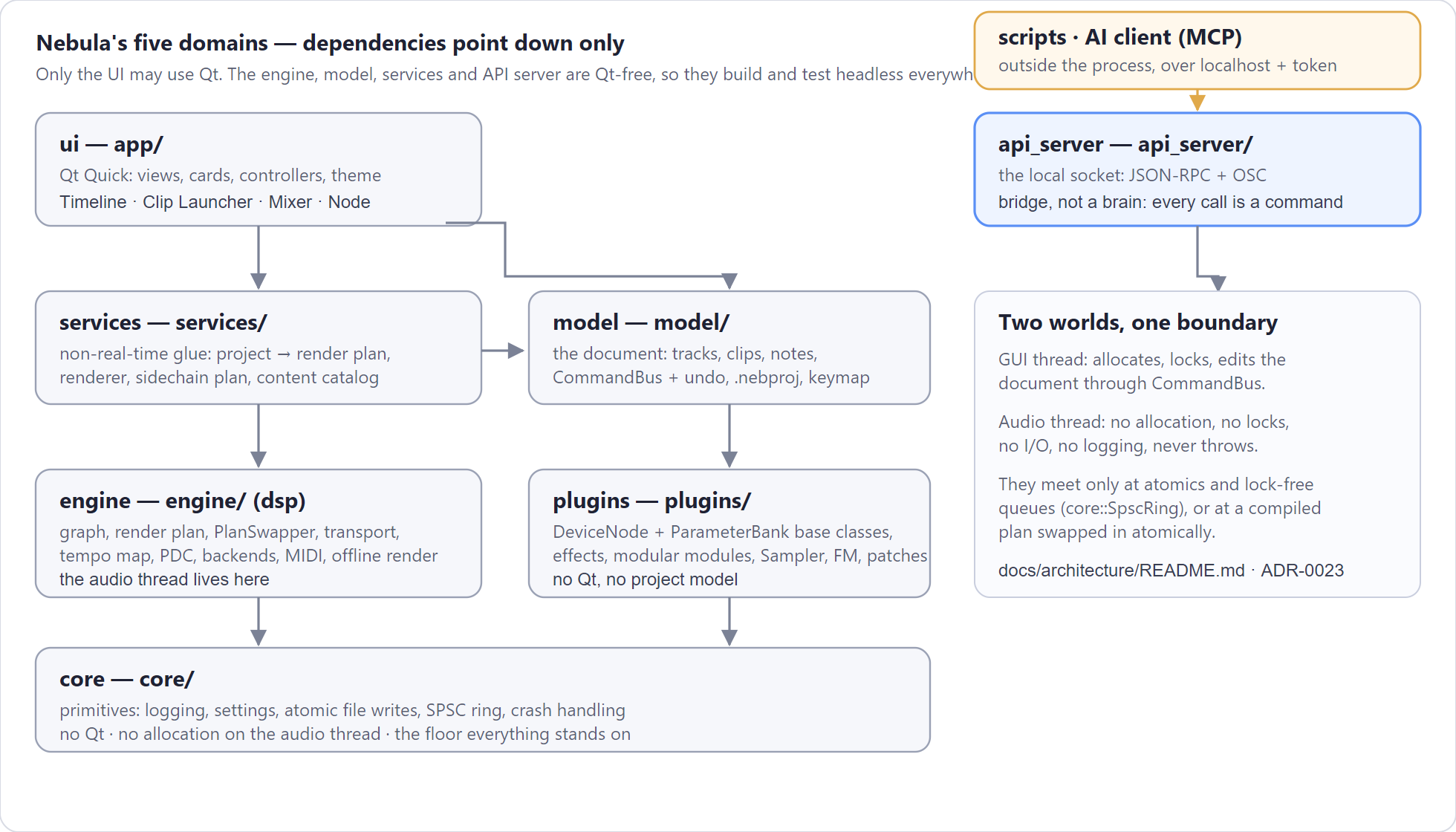
docs/architecture/README.md is the source of truth; this is the working summary.
| Rule | In one line | Enforced by |
|---|---|---|
| 1 — Strict thread separation | GUI thread allocates/locks; audio thread does not (no allocation, locks, I/O, logging, throwing) | NEBULA_NONBLOCKING annotations, RealtimeSanitizer CI job (Linux), allocation-tripwire tests (tests/core/test_rt_safety.cpp), ThreadSanitizer job, docs/architecture/rt-lock-audit.md |
| 2 — Lock-free communication | the UI talks to the engine only through atomics or core::SpscRing queues; a new channel needs an ADR |
the audit doc's sanctioned-channel list; review rule |
| 3 — Extensible instrument API | every instrument/effect is a DeviceNode with a stable knob table and no UI/project knowledge |
plugins/ boundary; tools/check_docs.py fails a plugins file that includes nebula/engine/… |
| 4 — Closed Core, Open API | the server is a bridge, not a brain: every API mutation goes through CommandBus |
app/src/api_controller.cpp; ADR-0024 |
| 5 — Isolated folder structure | five domains, dependencies point down only, only the UI may use Qt | LAYER_FORBIDDEN in tools/check_docs.py |
The five domains
| Domain | Meaning | Folders |
|---|---|---|
| core | foundation: primitives, document, undo, persistence | core/, model/, services/ |
| dsp | everything real-time: graph, transport, backends, DSP math | engine/ |
| plugins | instruments and effects: base classes + devices | plugins/ |
| ui | the Qt Quick application | app/ |
| api_server | the local IPC/socket server | api_server/ |
Dependencies: ui → core; api_server → core; dsp → core; plugins → core; services →
core + dsp. Nobody reaches up. Only app/ may include Qt — that is why the engine, model,
services and API server are all testable headless, and why the whole test suite runs on Linux in CI.
3. Repository map
core/        primitives: logging, settings, atomic file writes, SPSC ring, crash handler
model/       the document: Project, tracks, clips, notes, commands + CommandBus, undo history,
             ActionRegistry/Keymap, project_file (the .nebproj format)
engine/      the real-time side: graph, render plan, PlanSwapper, transport, tempo map, PDC,
             LiveEngine, audio backends (miniaudio: WASAPI/ALSA), MIDI (WinMM/ALSA), offline render
plugins/     DeviceNode + ParameterBank base classes, the effect implementations, the modular
             modules, Sampler, FM, the patch data (patches are built here, not in the engine)
services/    non-real-time glue: project → render plan, the renderer, sidechain planning, content
             catalog, one-shot generation, instrument resolution
api_server/  the Control API server (Qt-free): JSON-RPC framing, the socket, OSC
app/         the Qt Quick application: controllers (project, instrument, transport, render worker,
             shortcut manager), the QML views and cards, the theme engine
tests/       one suite per domain + the app suite (Qt), see §6
examples/    small runnable programs (render demos, song generators, one-shot export)
tools/       build/package/release scripts and the documentation guards
docs/        this manual, architecture, ADRs, plans, standards, learn, handoff
4. Getting set up
Windows (the primary development platform)
- Visual Studio 2022/2026 with the C++ workload, plus CMake and Ninja (or use the Visual Studio generator).
- Qt 6.8 — install with the online installer or
aqtinstall. The build finds it throughCMAKE_PREFIX_PATH. - Python 3 for the tools (guards, packaging helpers, the tutorial-image generator).
- REUSE for the licence lint (
pip install reuseoruvx --from reuse reuse).
# from the repository root
powershell -ExecutionPolicy Bypass -File tools\build.ps1          # configure + build (build/vs)
powershell -ExecutionPolicy Bypass -File tools\run.ps1            # package if needed, then run
tools/build.ps1 wraps CMake with the house settings; build/vs is the tree it produces. The app
binary lands in build/vs/bin/Release/nebula.exe, the test binaries in build/vs/tests/Release/.
Linux (and WSL)
The full recipe (Qt via aqtinstall, the apt packages, the app build) is in
docs/implementation/building.md and in this repository's own notes: mirror the tree onto the Linux
disk (never build under /mnt/d — the 9p mount dominates the build), configure with
-DNEBULA_BUILD_APP=ON, and keep NEBULA_WARNINGS_AS_ERRORS=OFF (GCC's -Wshadow fires on
pre-existing plugin code; MSVC does not warn there).
macOS
A build script exists (tools/make_installer_macos.sh) and qt_add_executable produces a .app,
but no one has ever run it: there is no Mac in this toolchain and no CI job. If you pick macOS
up, expect to implement CoreMIDI input as well — that is a named gap, not an oversight.
5. Building and what the build produces
| Target | What it is |
|---|---|
nebula |
the application (Qt Quick) |
nebula_<domain>_tests |
one test binary per domain: core, model, plugins, engine, services, api_server, app |
nebula_render_project_demo, nebula_make_song, nebula_gen_one_shots |
examples that build and render projects headlessly |
nebula_render_project_file |
renders a saved .nebproj to WAV with no window (batch/CI rendering) |
Build a single target with the CMake tool in your PATH, e.g.
cmake --build build/vs --config Release --target nebula_services_tests.
6. Tests
Expect two different counts, on purpose: Windows runs 1225 cases, Linux 907. The app
suite needs Qt and does not exist on Linux; core shows one assertion fewer there (a pre-existing
skip).
# Windows, all suites
foreach ($t in "core","model","plugins","engine","services","api_server","app") {
  & "build\vs\tests\Release\nebula_${t}_tests.exe"
}
# Linux/WSL, the six Qt-free suites
cd ~/nebulalinux/build/tests && for t in core model plugins engine services api_server; do ./nebula_${t}_tests; done
Catch2 tags make a focused run cheap: nebula_services_tests.exe "[sidechain]" or "[cache]".
When you add a feature, add cases in the suite of its domain; when you fix a bug, write the case
that would have caught it first.
Fault plants — the house practice
Before you call a guard "tested", break it on purpose, watch the test fail, then restore it. Every
release in PROGRESS.md records which plants were used and how many assertions caught them. It is
the cheapest way to know a test is really wired to the thing it claims to protect.
7. The guards (run these before you push)
| Command | What it protects |
|---|---|
python tools/check_docs.py |
licence headers and @file summaries on every source file, the VERSION format, Qt-module allow-list, layer rules, theme contrast, QML conventions, shipping wording, release traceability |
python tools/check_guards_selftest.py |
runs every guard against a deliberately broken tree — 67 probes; if a guard stops working, this fails |
uvx --from "reuse[charset-normalizer]" reuse lint |
licence compliance for every file (was 539/539 at this release) |
CI (.gitea/workflows/ci.yml) runs the same things plus the Windows and Linux builds; when the
runner is busy, run them locally — that is the norm here, not an exception.
8. Packaging, performance gates and installers
tools/package.ps1 is the release gate. It builds, runs the QML interface sweep (36 documented
screens opened headlessly, any QML runtime error fails the run), measures the performance gates,
and writes dist/Nebula-<version>/ plus the zip, keeping only the latest version.
| Gate | Target | Measured at alpha.272 |
|---|---|---|
| Startup to first frame | < 3000 ms | 2174 ms |
| Idle CPU (whole machine) | < 1 % | 0.55 % |
| RAM (working set) | < 300 MB | 261 MB |
Installers: tools/make_installer.ps1 (Windows, Inno Setup, verified by silent install → run →
uninstall), tools/make_installer_linux.sh (stages /opt/nebula, resolves the Qt runtime as a
closure over the binary, its libs, the plugins and every .so under qml/, runs the staged
bundle offscreen, then writes .deb + .tar.gz), tools/make_installer_macos.sh (untested).
Rule that came out of a real bug: run what you staged before you archive it. The first Linux
bundle shipped without libQt6QuickControls2Basic.so.6 — a QML style plugin loads it at run time
and nothing links it, so no ldd over the binary could see it. The staged smoke test caught it.
9. Adding an effect
- Implement the node in
plugins/src/— aDeviceNodesubclass with a static knob table (ParameterBank) using stable keys, a real-time-safeprocess(), andlatency_samples()if it delays the signal. No Qt, no project model, no allocation inprocess(). - Register it in
plugins/src/device_factory.cppwith a stable id (nebula.yourname) and add that id totrack_effect_ids()inplugins/src/device_preset.cpp— the API, the browser and the preset system all read that list. - Factory presets: add them next to the others in
device_preset.cpp. - Docs: the effects table in
docs/FEATURES.md, the effects plan page (docs/plan/effects-and-instruments.md), andPROGRESS.mdfor the release. - Tests: a case in
tests/plugins/for the DSP (measure it, do not eyeball it) and, if it can be keyed, a case intests/services/for the sidechain path. - Fault-plant it: break the guard you care about, confirm the test fails, restore.
10. Adding an instrument patch
Patches are data, built in plugins/src/patch.cpp (voice_patch, categorised_voice, pad_patch,
fm). Add the patch to the right family, keep the name unique, and give it a category. .nebpatch
files in dist/…/patches/ are the shipped, user-visible form; the sampler and the Drum Rack build
their nodes from instrument_config instead (services/src/track_instrument.cpp).
11. Adding a Control API method
- Add the handler in
app/src/api_controller.cpp: read parameters withrequire_string/require_number/optional_param, call the controller (never the model directly), and return a JSON string. - Keep the reply small: the wire limit is 8 KiB per line (
api_server/include/…/messages.h,kMax). A method whose reply can exceed it must page or summarise — two methods (instruments.list,devices.catalogue) currently exceed it and never answer; do not copy that pattern (see §14). - Register the method in the contract document (
docs/adr/0024-control-api-v1.mdand the API repository's schema) and add it to the OSC map inapi_server/src/osc.cppif it should be reachable from hardware. - Add cases to
tests/api_server/(framing, tokens, errors) and, if it mutates, prove it is undoable.
12. Adding a UI surface
QML lives in app/, one file per card or view, with a Panel/Card base. The house conventions are
checked by guards, so read them before you write:
- No hard-coded colours — use the theme (
check_qml_colours). qsTr()for every user-visible string (check_qml_help, translations).- Every control gets a
help:line — the bottom strip reads it (check_qml_help). - Accessible names/roles on interactive controls (
check_qml_accessible). - Property names: declare
required property var modelData(andindex) on delegates that read model data — reaching model data as a context value works in the delegate but breaks when the delegate is reached by id (a real bug this repo shipped once). - Add a sweep row:
tools/package.ps1opens every documented screen headlessly. A surface that no--demo-*switch can reach is a surface no test ever builds — add a switch and a row.
13. The project file format
.nebproj is JSON (model/src/project_file.cpp): format, format_version, id, name,
tempo_bpm, tempo_events, loop fields, and tracks (each with clips → notes, devices →
parameters, instrument_patch, instrument_config, volume, pan, muted, solo, kind).
Rules:
- Unknown fields are preserved on load, so an older build does not destroy a newer file.
- Migrations are versioned and tested against a corpus of older files.
- Writes are atomic (
core::write_file_atomically: side file → fsync → rename) and rotate backups; a kill during a save must never lose the previous file. - A project can carry its samples (the
samplesmap) so it is portable.
14. Known defects and gaps (as of this writing)
| Item | Detail |
|---|---|
| Incremental builds can lie (not a defect) | One Linux build failed the node-cache tail cases in tests/services/test_live_state.cpp; a clean build of the same sources passes (services: 268 cases), as do rebuilds and ASan/UBSan at -O1/-O3. The print-that-fixed-it was in a HEADER, so it forced every dependent file to recompile and repaired an inconsistent incremental build — rsync -a keeps the Windows source mtimes, which can be older than the WSL objects, so ninja silently skips them and the mirror runs a binary that does not match its sources. Rebuild cleanly before reporting a cross-platform failure. |
| macOS | untested; no CoreMIDI input; no signing. |
| Multi-core render | single-threaded; only the backing render runs on a worker thread. |
| Screenshot frame runs are slow | --screenshot-frames re-renders the window per frame (~2.9 s a frame, much slower when the window is not in front) and the Control API does not answer while a frame is being rendered. Use a small count; capture one still per state for animated pictures. |
15. Release discipline
Every unit of work ships as a release, and the shape is always the same:
- One feature per release. Give it an AC id (the ledger in
PROGRESS.md/docs/CHANGELOG-ARCH.md) and bumpVERSION(semver; the guard checks the tag matches). - Docs in the same change:
CHANGELOG.md(user-facing),PROGRESS.md(what shipped, what the tests measured, which fault plants were used, the next AC id),docs/CHANGELOG-ARCH.md(architectural note),docs/handoff/HANDOFF.md(§3/§5/§6 state, gaps and next steps). - Gates green:
check_docs, the guard selftest,reuse lint, both test suites, and the packaging gate (tools/package.ps1) which also publishes the Windows package. - Commit, tag, push both remotes (GitHub + Gitea) and verify peeled-tag parity.
- Never claim an untested platform works. Say "unverified" and name what is missing.
16. Real-time rules for contributors (the short version)
- No
new/malloc, nostd::stringgrowth, no locks, no file or network I/O, no logging, no exceptions on the audio thread. - Crossing the boundary: atomics or
core::SpscRing. Adding a channel means an ADR. - Structural changes (a new graph) go through compile + atomic swap on the control thread, never by locking the audio thread.
- A device that delays audio must report
latency_samples(); PDC aligns it. - If a change makes you want a lock on the callback path, the design is wrong — redesign it.
17. Debugging
- Logs: the LOG card in the app, and the file the Logging settings page names.
--demo-errorwrites a known error line;--demo-crashcrashes on purpose to exercise the crash reporter. - Screenshots:
--screenshot <file>renders the window to a file and quits — the basis of every picture in the manual and of the interface sweep.--screenshot <folder> --screenshot-frames <n> --screenshot-every <ms>saves a numbered run of pictures instead (the frames of an animated picture). Each frame re-renders the whole window, so a run costs seconds per frame — and while a frame is being rendered the GUI thread is busy, so the Control API does not answer during a run. On a machine where the window is not in front, repeated grabs are much slower still: for animated documentation pictures, capturing one still per state and cycling them is the reliable route. - A clean slate:
--data-dir <fresh folder>runs with empty settings and no user content. - Linux verification: mirror the tree to a Linux disk and build there; the notes on doing it
(and the traps) are in
docs/implementation/building.mdand the project's own WSL recipe. - Interface sweep: when a screen is broken but nothing crashes, run the sweep — QML runtime
errors are invisible in a GUI build's exit code unless
QT_ASSUME_STDERR_HAS_CONSOLE=1is set, which the packaging script does for you.
18. Where to look next
| Question | Document |
|---|---|
| What is true right now? | docs/FEATURES.md, docs/handoff/HANDOFF.md |
| Why is it built this way? | docs/adr/README.md (18 ADRs) |
| What are the rules? | docs/architecture/README.md, AGENTS.md |
| What comes next? | docs/plan/phases.md and the other plan pages |
| How do I build/package it? | docs/implementation/building.md, tools/ |
| How does the code talk to itself? | docs/architecture/README.md §2 (threads), ADR-0017 (graph), ADR-0022 (project → audio) |
| What did the last release change? | PROGRESS.md, docs/CHANGELOG-ARCH.md |
Updated 2026-11-03